A script in our app wrote a page to /code/snake_game/index.html. Then the app's own browser was told to open /code/snake_game/index.html, and nothing happened. Not a crash, not an error page — an empty view.
The reason is almost embarrassingly simple: /code/snake_game/index.html is a path, and WKWebView loads URLs. Everything else in this post follows from that gap, plus three constraints that Apple puts on ordinary apps, and the design that had to bend around all four.
The constraints
The first one is the one people notice. A third-party iOS app cannot create memory that is both writable and executable, so a JavaScript engine inside it runs in interpreter mode. WebKit gets a JIT through a special entitlement; we don't. Interpretation is fine for the kind of work an agent asks for — short scripts, string and JSON work, a small HTTP client — but you feel it in anything with a tight loop, and you design for it instead of pretending it away.
The second: an app can't start a process. There is no shell to find and no fork/exec to call, so "just run node on this file" is not a design we could pick. What an app can do is hand work to the system: URL schemes, App Intents, and Shortcuts. Our app exposes App Intents and can run a Shortcut by name, then read the result back through a callback. That is a real escape hatch, and it is a different escape hatch from a shell — you get a tool the user already owns, not a process you control.
The third is more subtle, because it is ours rather than iOS's. Our JavaScript runtime has no listening sockets: the Node-compatible http module we ship throws on createServer instead of pretending.
// createServer stub
http.createServer = function () {
  throw new Error('http.createServer() is not supported on iOS — no TCP server capability');
};
To be precise: iOS does not forbid listening. Our own app binds a local port in debug builds. What's true is that the script sandbox has no server capability, and that's a boundary we chose — worth saying plainly, because the usual trick of starting a tiny web server and pointing the browser at localhost is simply unavailable to the scripts.
Put together: no JIT, no processes, no sockets. The scripts still have to run, write files, fetch things, and display a result. Which leaves exactly one channel between the runtime and the browser: the file system.
The runtime
The engine is JavaScriptCore, and it is pinned to one dedicated thread with its own run loop. A JSContext is not thread-safe, and timers need a run loop to fire, so every entry point hops onto that thread instead of taking a lock:
private let jsThread: Thread
private let jsRunLoop: CFRunLoop

func onJSThread(_ block: @escaping () -> Void) {
    CFRunLoopPerformBlock(jsRunLoop, CFRunLoopMode.defaultMode.rawValue, block)
    CFRunLoopWakeUp(jsRunLoop)
}
On top of it sit sixteen Node-compatible modules — fs, path, crypto, http, https, events, stream, timers, process, url, assert, buffer, os, querystring, util, child_process — and the ones that touch the device call into Swift rather than fake an OS. fs writes through a bridge (__fs_writeFileSync), which means a script's file operations land on the real sandbox. child_process can't spawn anything, and it says so instead of returning a hollow success. require is CommonJS.
One more constraint shaped the runtime, and it's the one I find most interesting in practice: you can't ship a new library per feature, because every bundled dependency means another App Review cycle. So packages arrive at runtime. pkg add underscore resolves on jsDelivr, asks for the package's package.json, prefers its browser field, and then walks a list of conventional build locations until one returns a JavaScript file it can run:
const pkgJsonUrl = `https://cdn.jsdelivr.net/npm/${encoded}@latest/package.json`;
const pkg = await r.json();
entryPoint = pkg.browser || pkg.main || null;

const base = `https://cdn.jsdelivr.net/npm/${encoded}@latest`;
const candidates = [
  entryPoint ? `${base}/${entryPoint}` : null,
  `${base}/dist/${pkgName}.min.js`,
  `${base}/${pkgName}.min.js`,
  `${base}/dist/umd/${pkgName}.min.js`,
  ...
].filter(Boolean);
This is not npm. It's browser-compatible pure JavaScript, no native modules, no build step — the package folder's own README says as much. That limit is real; the upside is that the ceiling on what a script can pull in is set by what's already published on a CDN, not by what we bundled in the last release.
The bug
So the runtime writes real files, and the browser reads real files. The only thing left is agreeing on what a path means.
The terminal gave the scripts a small virtual vocabulary: ~ and ~/... mean the code folder, /workspace means a workspace subfolder, /code/... means the code tree, and absolute paths mean the sandbox root. An agent learns those paths from its own tool output, and then it uses them everywhere — including when it asks the browser to open a page. Which is when WKWebView gets handed a string it can't do anything with.
The fix was to teach the browser the terminal's vocabulary rather than the other way round:
func resolveSandboxPathForBrowser(_ path: String) -> URL {
    let trimmed = path.trimmingCharacters(in: .whitespacesAndNewlines)
    let docs = FileManager.default.urls(for: .documentDirectory, in: .userDomainMask)[0]
    let code = docs.appendingPathComponent("code")

    if trimmed == "~" || trimmed == "~/" { return code }
    if trimmed.hasPrefix("~/") { return code.appendingPathComponent(String(trimmed.dropFirst(2))) }
    if trimmed == "/workspace" { return code.appendingPathComponent("workspace") }
    if trimmed.hasPrefix("/workspace/") {
        return code.appendingPathComponent("workspace/" + String(trimmed.dropFirst("/workspace/".count)))
    }
    if trimmed.hasPrefix("/") {
        // Absolute sandbox path — Documents is the sandbox root
        return docs.appendingPathComponent(String(trimmed.dropFirst()))
    }
    return docs.appendingPathComponent(trimmed)
}
And the navigate branch that uses it, in order of preference:
case .navigate(let url):
    var finalURL = url
    if !(finalURL.hasPrefix("http://") || finalURL.hasPrefix("https://") || finalURL.hasPrefix("file://")) {
        // 1) Real absolute filesystem path (e.g. /var/mobile/Containers/...)
        if FileManager.default.fileExists(atPath: finalURL) {
            finalURL = URL(fileURLWithPath: finalURL).absoluteString
        } else {
            // 2) Virtual sandbox path (/code/..., ~/..., /workspace/...) → real
            //    Documents URL, mirroring TerminalManager's path model so the AI
            //    can open in the browser whatever paths the terminal taught it.
            let resolvedURL = BrowserController.shared.resolveSandboxPathForBrowser(finalURL)
            if FileManager.default.fileExists(atPath: resolvedURL.path) {
                finalURL = resolvedURL.absoluteString
            } else if let bundlePath = Bundle.main.path(forResource: finalURL, ofType: nil) {
                finalURL = URL(fileURLWithPath: bundlePath).absoluteString
            } else {
                print("navigate|File not found locally for path: \(finalURL), treating as remote URL if applicable.")
            }
        }
    }
    loadURL(finalURL)
Three cases in order: a real absolute container path passes straight through; a virtual path gets resolved and checked; if neither exists, we fall back to a resource inside the app bundle. Nothing is opened speculatively — the file has to exist before we hand the URL to WebKit.
We could have kept the whole thing virtual with a WKURLSchemeHandler and never touched the real file system. We chose file:// because relative assets then work for free: the sketch page sits next to its own p5.js, and the web view resolves that reference from the file system without us intercepting every subresource request. That mattered more than the tidiness of a custom scheme.
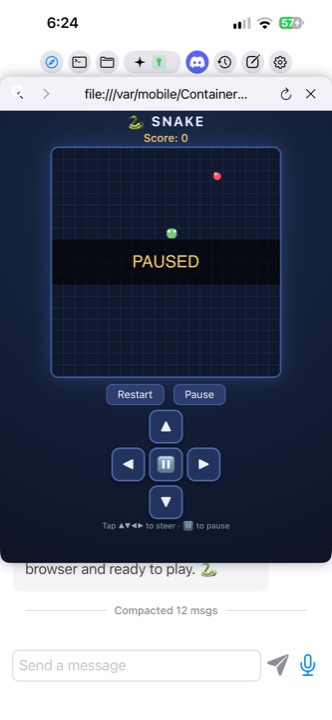
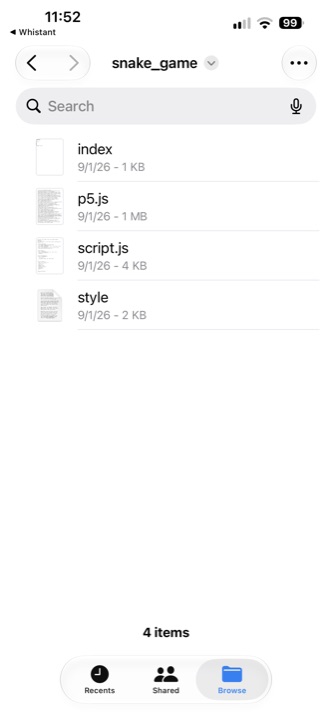
The result, on the device: a page written by a script opens in the app's own browser at file:///var/mobile/Containers/Data/Application/<uuid>/Documents/code/snake_game/index.html, loads its sibling p5.js (1,004.98 KB in the project folder), and runs.
What it actually looked like when it worked
The test I keep coming back to is a small one, because it exercises every layer at once. A request for a snake game produced four files in the sandbox — index.html (1.17 KB), p5.js (1,004.98 KB), script.js (3.93 KB), style.css (1.71 KB) — with the drawing library fetched from the CDN during the session rather than bundled. Then the page was opened in the app's browser and its state was read back programmatically, which is the only way I trust that a web view is doing anything: the game's own state object reported the snake at (19, 10), and after a restart and a turn, the length went to 2 and the score to 10 as it ate.
What still doesn't work
One version of p5 never finished starting inside the web view — its setup flag stayed false and the canvas never appeared — while an older build worked immediately. I have no explanation for it yet, and it's the kind of bug that makes me distrust "it worked on my machine" reasoning in this stack. If you've seen something similar with a canvas library inside WKWebView, I'd like to hear it.
Two smaller things: page interaction driven from code is less reliable than reading state, so we verify by reading the page's state rather than trusting that a synthesized tap "took"; and interpreter speed is a real budget when users write the loops, so it's worth measuring before promising anything.
Open questions
If you've shipped something like this, I'd genuinely like to compare notes on three things. How do you budget interpreted code when the user writes it — iteration caps, time boxes, or moving hot paths down into Swift? Would you let a shipped app pull code off a CDN at runtime, and if so how do you police what arrives? And has anyone measured in-process WASM against this workload — it's interpreter-only in the same environment, so I'm curious whether it actually pays off.